Schemas
Schemas is the index of what's actually inside your connected databases — tables, columns and types. It exists so the Analyst can ground its SQL in your real structure instead of guessing at column names.
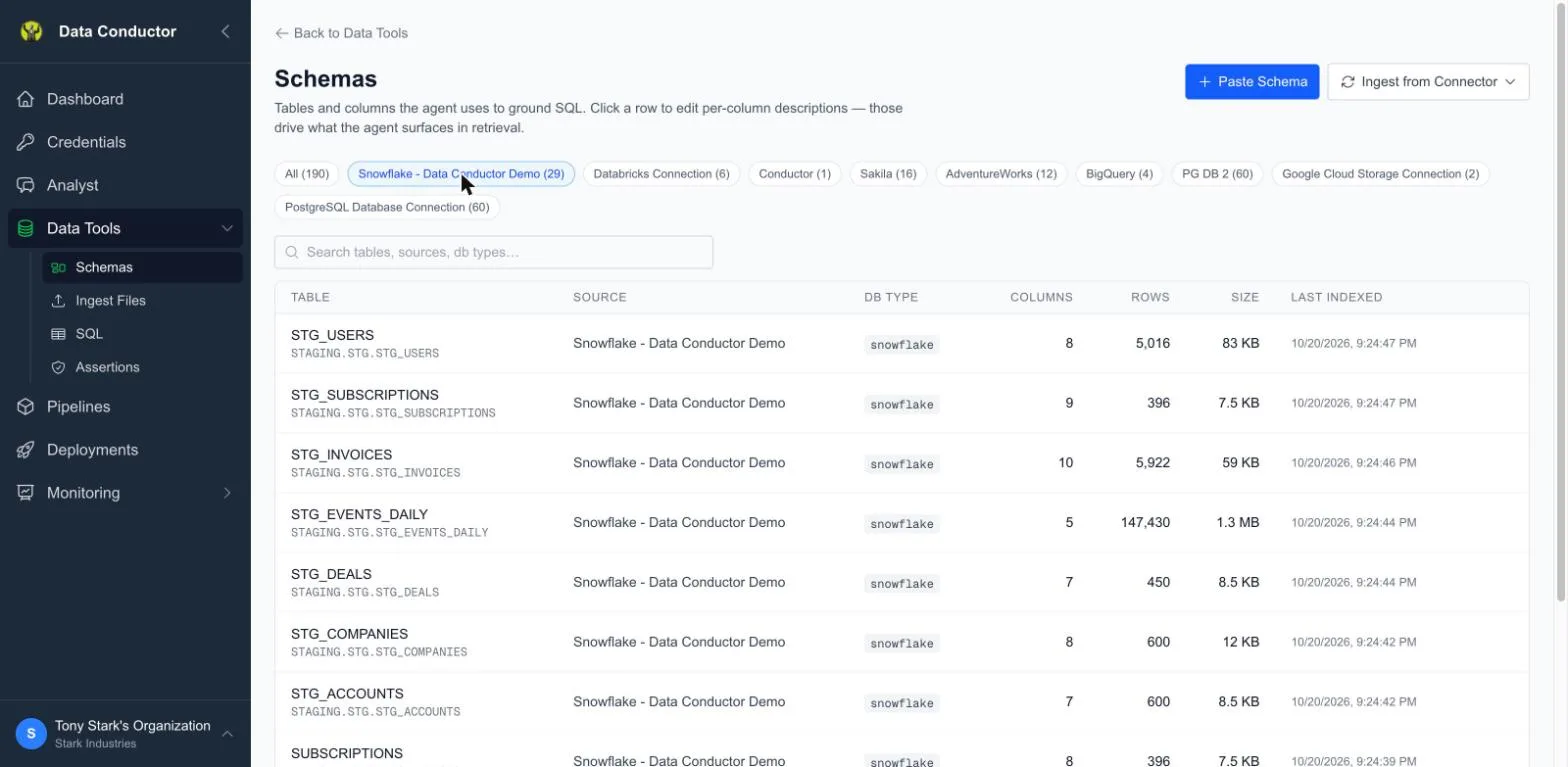
Where it comes from
Two ways to populate it:
- Ingest from Connector — point at a connection and Data Conductor reads its structure directly.
- Paste a schema — at Schemas → New, paste a schema payload. Useful when a database isn't reachable from Data Conductor but you still want the Analyst to know its shape.
Browsing
The list shows one row per table, not per connection, so a warehouse with two hundred tables reads as two hundred rows rather than one. Clicking a table opens its columns.
Descriptions matter
Column descriptions are editable inline. They're worth filling in for anything
non-obvious — status, type, coded integers — because they're what the
Analyst reads when deciding which column answers a question. Saving a
description re-indexes that column immediately; there's no separate rebuild
step.
Let the agent write them
Describing two hundred columns by hand is why schema documentation does not get done. Open a table and click Enrich with AI — the button says how many columns are still empty — and the agent writes them for you.
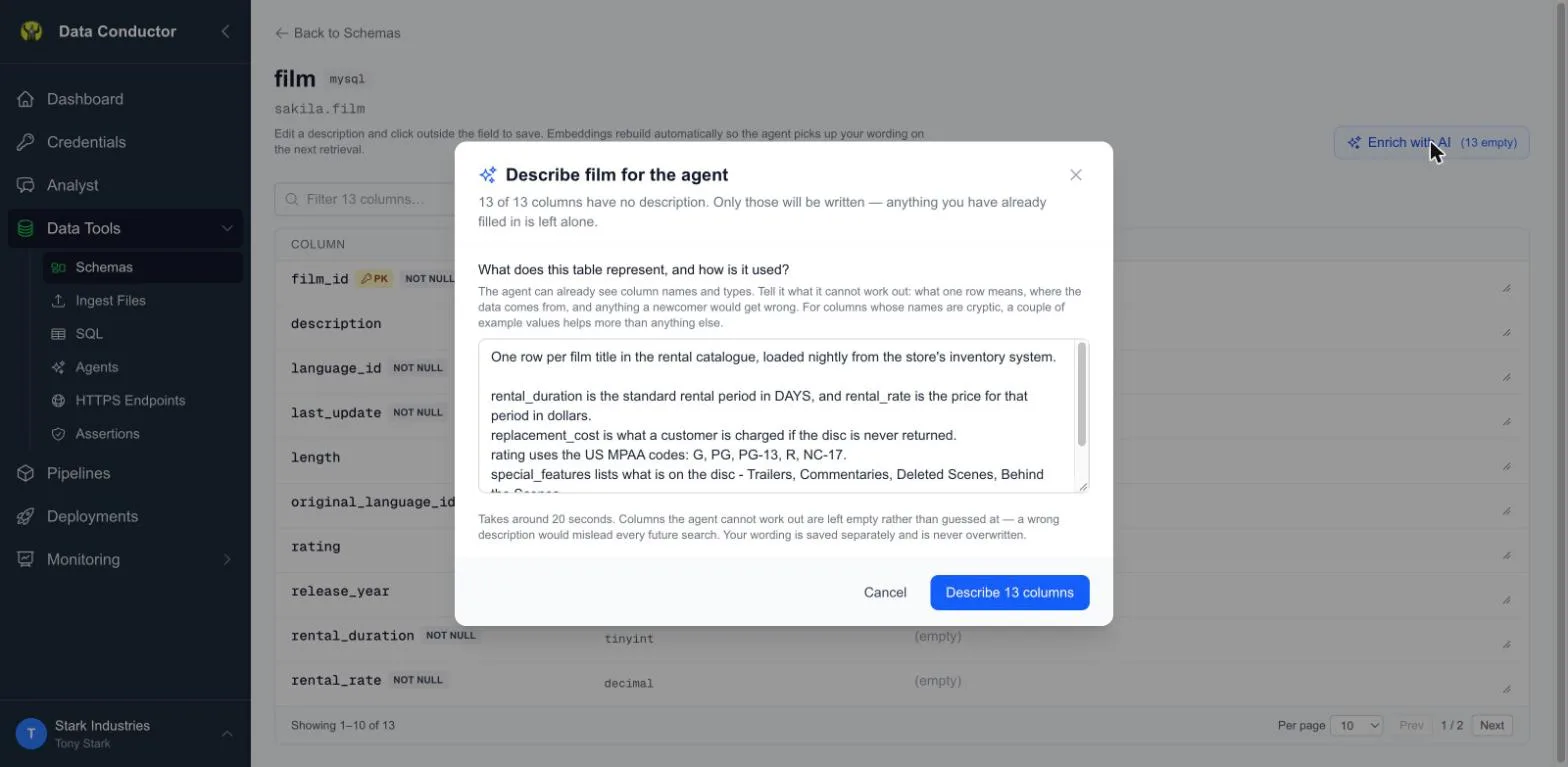
It asks you for one thing first: what the table represents and how it is used. That is not a formality. The agent can already see column names and types; what it cannot work out is what one row means, where the data comes from, and which names are misleading. For cryptic columns, two example values help more than a paragraph.
One row per film title in the rental catalogue, loaded nightly from the
store's inventory system.

rental_duration is the standard rental period in DAYS, and rental_rate is
the price for that period in dollars.
replacement_cost is what a customer is charged if the disc is never returned.
rating uses the US MPAA codes: G, PG, PG-13, R, NC-17.
special_features lists what is on the disc - Trailers, Commentaries,
Deleted Scenes, Behind the Scenes.
length is the running time in minutes, not the rental period.
A run takes around twenty seconds. Four things are worth knowing before you use it:
- It never reads your data. No
SELECTis issued against your tables and no values from them are sent anywhere. Example values come from you, in the box above — you choose what to disclose, and you can invent representative values instead of using real ones. - It only fills blanks. Anything already written — by you, by a previous run, or imported as a real database comment — is left exactly as it is. There is no overwrite.
- It leaves columns blank rather than guess. A description that is wrong misleads every future search, so the agent abstains when it is not confident. The result tells you both numbers: how many were described, and how many were left blank for want of context.
- Running it again is worth it. A second run skips everything already described and re-attempts only the columns it abstained on — which is exactly what you want after adding detail about the ones it could not place.
Everything it wrote carries an AI badge, so you can always tell its wording from your own — and you can edit any of it inline afterwards.
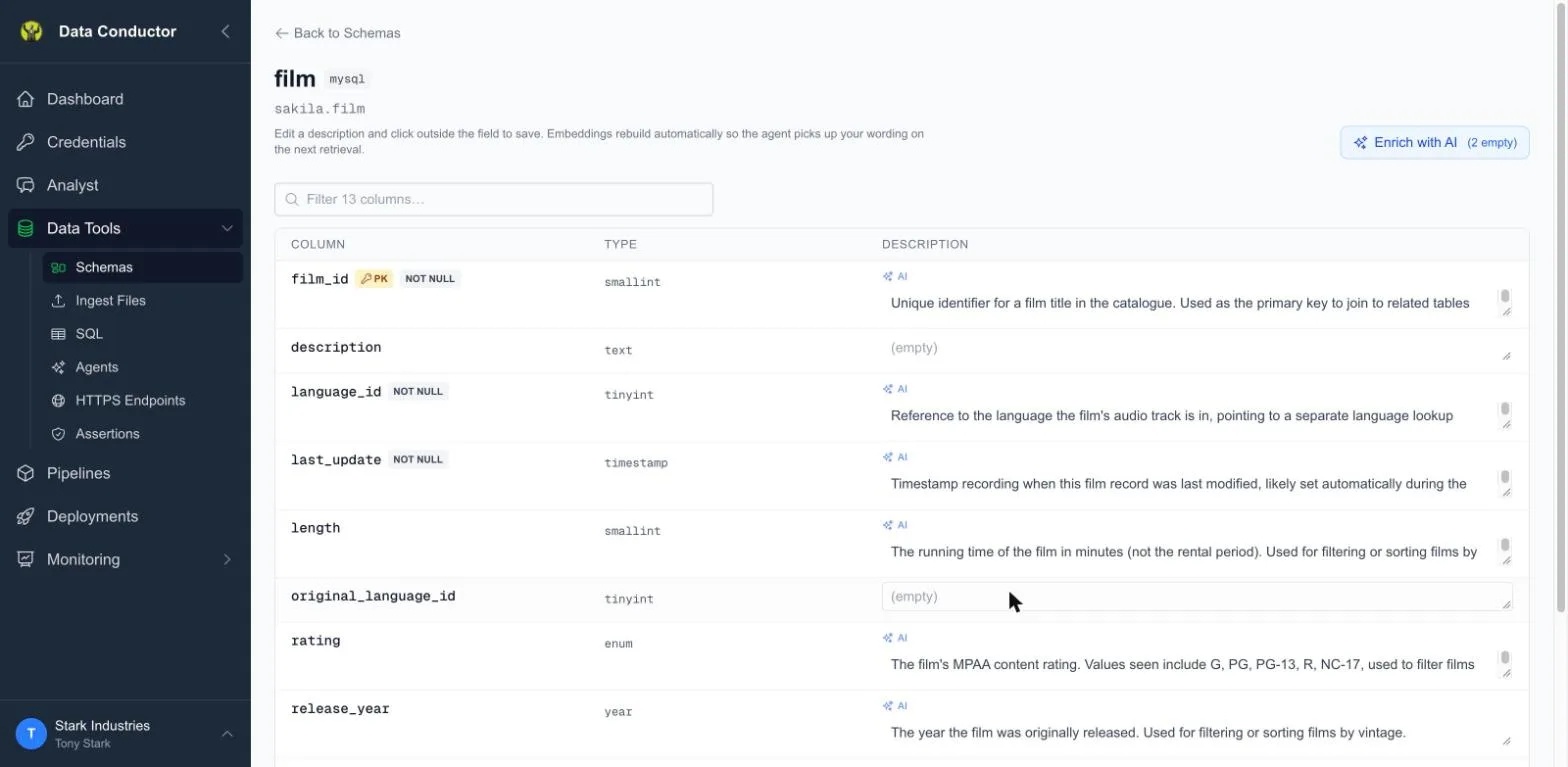
That run on a 13-column table came back 11 described, 2 left blank. The two
it refused were description and original_language_id — the only two the
context above says nothing about. length came back as "the running time of
the film in minutes (not the rental period)", which it could only know because
the context said so.
Abstentions are the feature working, not failing. The columns it refuses twice
are usually the ones that genuinely need a human: an internal code, a legacy
flag, a category that means something only your team knows.
What gets read, and what does not
Indexing reads your catalogue, not your rows. It asks the database what
tables and columns exist — information_schema on Postgres, MySQL and
Snowflake, the equivalent catalogue elsewhere — and stores names, types and
nullability. No SELECT runs against your data, and no values from your
tables are stored.
Two things follow from that, and both matter when someone asks whether this is safe to point at production:
- Indexing a two-hundred-table warehouse is cheap, because it is a handful of catalogue queries rather than a scan.
- A column full of personal data is indexed by name and type only. Data
Conductor knows you have an
emailcolumn of typevarchar; it has never seen a single address in it.
The one thing beyond structure is size: row counts and bytes, read from
the same catalogue. Snowflake and BigQuery maintain exact figures, so those
are reported as given. Postgres, MySQL and SQL Server report planner
statistics, which are estimates, and those are shown with a ~. A table that
has never been analysed reports nothing at all rather than zero — "unknown"
and "empty" are different answers and the list keeps them apart.
Keeping it current
Schema drifts. Re-index a connection after a migration, or after adding tables, so the Analyst isn't reasoning about a shape that no longer exists.
When to re-index
| After | Re-index? | Why |
|---|---|---|
| A migration that adds or drops columns | Yes | The Analyst writes SQL against columns it believes exist |
| A new table you want to query | Yes | An unindexed table is invisible to the Analyst |
| Rows inserted or deleted | No, unless you want current sizes | Structure has not changed |
| Renaming a connection | No | The index is keyed to the connection, not its label |
Re-indexing replaces what it finds and leaves your column descriptions in place, so the work of describing a table is not lost to a migration.
A worked example
Stark Industries connects a Snowflake warehouse holding manufacturing telemetry, then indexes it:
- Credentials → Snowflake → Re-index. The connection is read and its tables appear in Schemas, one row each, with row counts and sizes.
- Open
SENSOR_READINGS. The columns are listed with their types.statusis an integer, which tells a reader nothing. - Describe the ambiguous ones.
statusgets "0 = offline, 1 = nominal, 2 = fault — set by the line controller, not by an operator". That sentence is now what the Analyst reads when someone asks "how many lines are in fault". - Ask the Analyst. "Which assembly lines reported a fault yesterday?" It
writes SQL against
SENSOR_READINGSusingstatus = 2, because the description told it what the integer means.
Step 3 is the one people skip and the one that decides whether step 4 works.
A column called status with no description is a coin flip; the same column
with one sentence under it is unambiguous.
Related
- Credentials — the connections being indexed
- Analyst — what consumes this