Agents
An agent is a prompt your pipeline runs. It is a step, like a SQL step: it takes named inputs, it produces output, and the steps after it can read what it produced.
A SQL step asks your warehouse a question. An agent step asks a model one.
That is the whole idea. Everything below is about the three things that make it dependable rather than a novelty: what it is allowed to see, what shape it must answer in, and how a later step acts on the answer.
Agent or Analyst?
Both involve a model, and they are not the same feature.
| Agent step | Analyst | |
|---|---|---|
| What it is | A step you build, saved and versioned | The chat assistant |
| When it runs | Every time the pipeline runs, on schedule | When you are talking to it |
| Who is watching | Nobody — it runs at 2am | You are |
| What it can do | Answer the prompt. Nothing else | Query, build, save, deploy |
| Where it lives | Data Tools → Agents | Analyst |
The Analyst helps you build things. An agent is a thing you built.
Before you start: a model credential
An agent runs against a connection you add yourself, under Credentials → Add Integration, using your own API key. Five providers are available:
| Provider | Note |
|---|---|
| Claude | Anthropic |
| Google AI Studio Gemini | |
| OpenAI LLM | |
| Perplexity | Its online models answer with live web context — a lookup on the open web, not inference alone |
| xAI Grok |
The key is stored the way every credential is: encrypted per secret, under a key belonging to your organisation. See Security.
Building one
Data Tools → Agents → New Agent → Pipeline Agents.
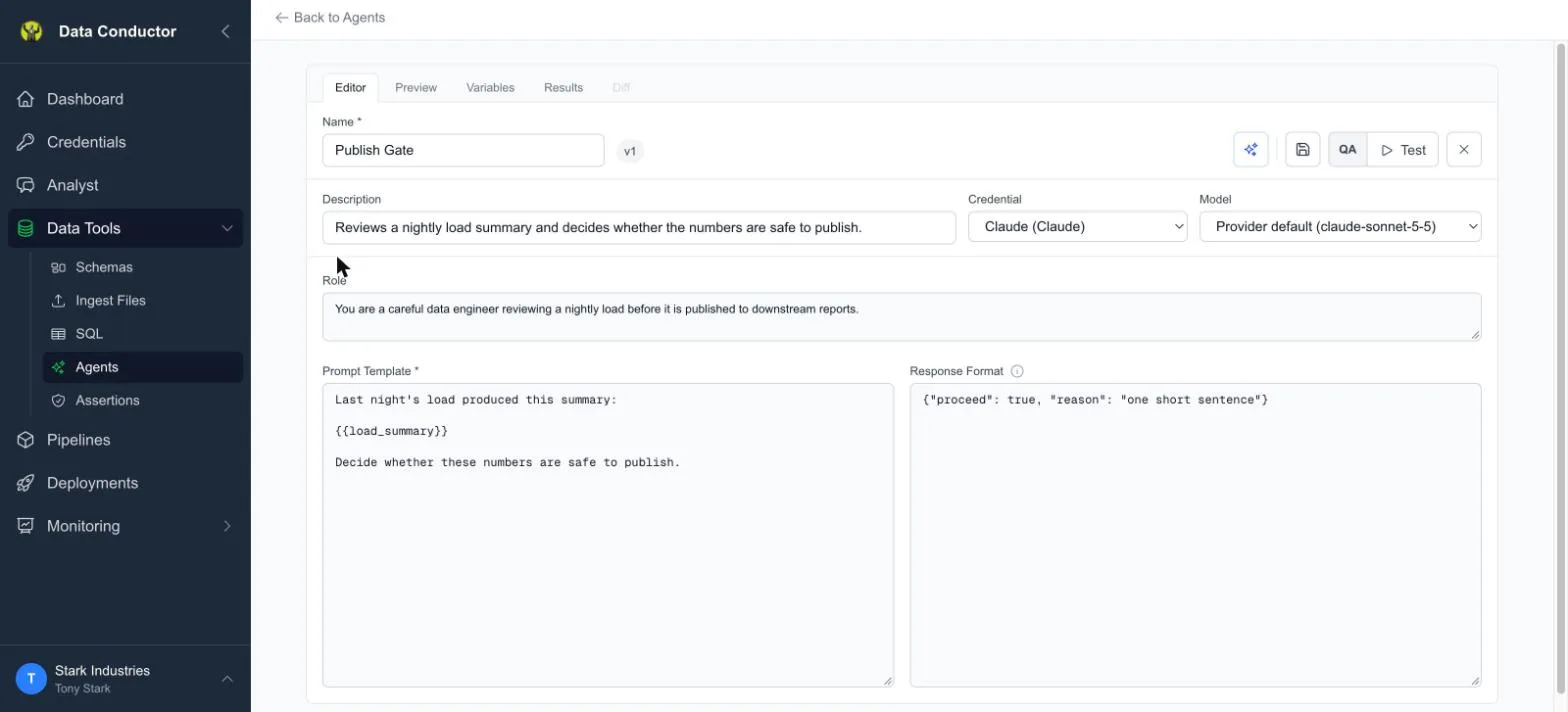
| Field | What it is for |
|---|---|
| Name, Description | How you will recognise it in a step picker a month from now |
| Credential | Which provider, and whose key |
| Model | Enabled once a credential is chosen |
| Role | The standing instruction — who the model is being, every run |
| Prompt Template | The question, with {{placeholders}} for the data |
| Response Format | The shape the answer must come back in |
The model list comes from the provider, not from us, so it reflects what your key can actually reach today. Leave it on Provider default and you get a current model without pinning one. Two providers — Perplexity and Grok — publish no model list, so for those we show the models we know about and mark them as possibly out of date.
Giving it data
A prompt that always says the same thing will always get the same answer.
The {{placeholders}} are where the run's data goes, and they are filled
from exactly two places:
- A declared input — one named field, from one named upstream step. You set these up on the step, in the pipeline.
- A variable — a value you set per environment, on the agent's Variables tab, the same QA/PROD model the rest of the platform uses.
Three rules fall out of that, and each exists because the alternative is worse:
- A placeholder nothing fills stops the run. The step fails and names
what was missing. An agent handed the literal text
{{load_summary}}will answer anyway — plausibly, and about nothing — and that answer would then flow downstream as though it meant something. - A name supplied by both an input and a variable stops the run too. There is no precedence rule to remember, because a silent winner is how you end up debugging the wrong value at 2am.
- Nothing else is sent. Not the rest of the upstream rows, not your schema. If the prompt does not name it, the model does not see it.
The response format
Plain text is fine if the agent's job is to write something — a summary, an explanation. It is stored so later steps can still read it.
Ask for JSON if you want the pipeline to act on the answer. Put an example object in Response Format and the agent answers in that shape:
{ "proceed": true, "reason": "one short sentence" }
Those keys are what a later condition can branch on. Writing the format is therefore not decoration — it is how you decide what questions the rest of the pipeline is allowed to ask about the answer.
Test it before you trust it
Test sends the prompt to the model now, with your draft as it stands — no saving, no pipeline, no schedule. You see the prompt that was actually sent and the answer that came back.
Do this before putting an agent in a pipeline. A prompt that reads perfectly to you can still produce an answer in the wrong shape, and finding that out on a 2am run costs a night.
Putting it in a pipeline
Add an agent step the way you add any step, and connect the step whose output it needs.
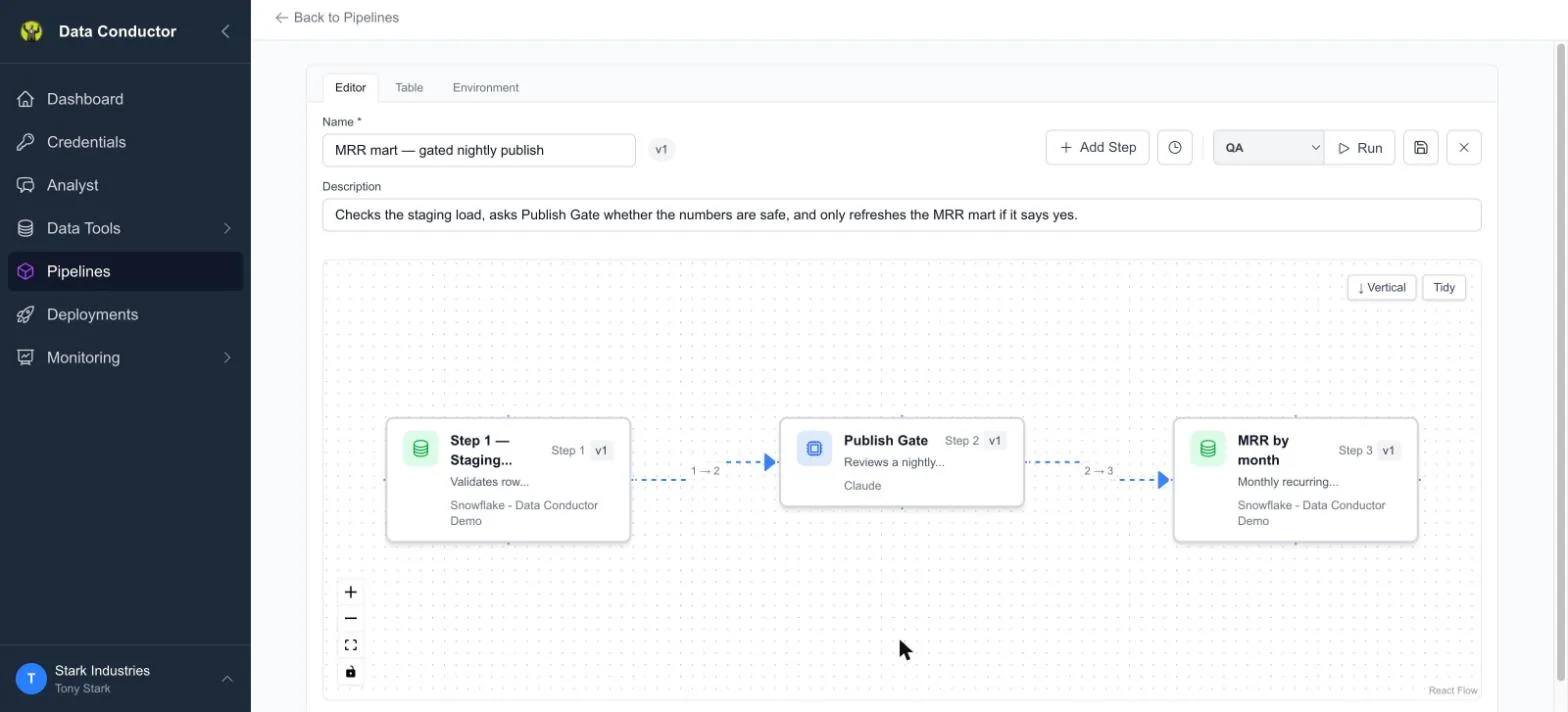
Declare its inputs. Double-click the agent step to open its gates
dialog, and under Inputs add one row per {{placeholder}}: which
upstream step, which field on that step's output, and the name the prompt
uses. A step can only draw from steps it waits for, so connect it on the
canvas first.
Then branch on what it answered. Double-click the edge leaving the agent
step and write a condition against one of the fields from the response
format — proceed, in the example above. The fields the agent
promises are offered as suggestions, and the input stays free text, because
a response format is a declaration rather than a guarantee.
What an agent step cannot do
It has no tools. An agent inside a pipeline cannot query a database, call an API, or take any action. It is given a prompt and returns an answer.
This is deliberate. A scheduled run has nobody present to approve anything, and a capability with no consent step is not one we will hand to a model running unattended at 2am.
It fails rather than skips. If an agent step goes wrong — a dead model, an unfilled placeholder, a deactivated credential — the step fails and the run stops where it stopped. A quiet skip would let a pipeline carry on as though a decision had been made.
Versions and activation
Agents version like everything else here: edit a saved agent and you create a new version, with the previous one kept. A pipeline step points at a specific version, so editing an agent does not silently change what a deployed pipeline runs.
Deactivating an agent stops any pipeline that uses it, by design — the run fails and says the agent is deactivated, rather than quietly skipping the decision it was there to make.
What it costs
Agent runs consume tokens against your plan, and so does Test — it is a real call to a real model, billed like any other. Your token usage is on the Dashboard.
Test is deliberately billed rather than absorbed: it is a call you chose to make, at a moment you remember, and a cost that appears without an action you can point at is worse than one that does.